Your 10,000 Videos Organized Instantly
Point. Click. Done. Seconds for a whole library. SiftVid reads filenames and extracts tags, categories, and metadata. Zero manual work.
You Have Thousands of Randomly-Named Files. Let's Fix That.
You've accumulated video files over years. Multiple sources, different naming conventions, zero organization. Files named like clip_720p_final_v2.mp4 or5d733c4f89b3_source.mp4 that tell you nothing about what's inside.
Windows Explorer shows you filenames. That's it. No fuzzy search, no tag filters, no way to find anything without clicking through folders for 30 minutes.
Step 1: Select Your Folder (5 seconds)
Click “Select Folder” in the app. Choose where your videos are. Done.
Works with any structure: a single folder of 50 videos, multiple folders across different drives, organized subfolders or complete chaos, any video format (MP4, MKV, AVI, MOV, WebM).
Step 2: SiftVid Scans Everything (instantly)
The app reads every filename and extracts:
- Tags and categories from filenames
- Locations and subjects
- Quality metadata (resolution, codec, bitrate)
- File properties (size, duration, date)
Processing time: under 1 second for 1,000 videos, and a few seconds for a large library on an external spinning drive. You don't type anything. You don't tag anything.
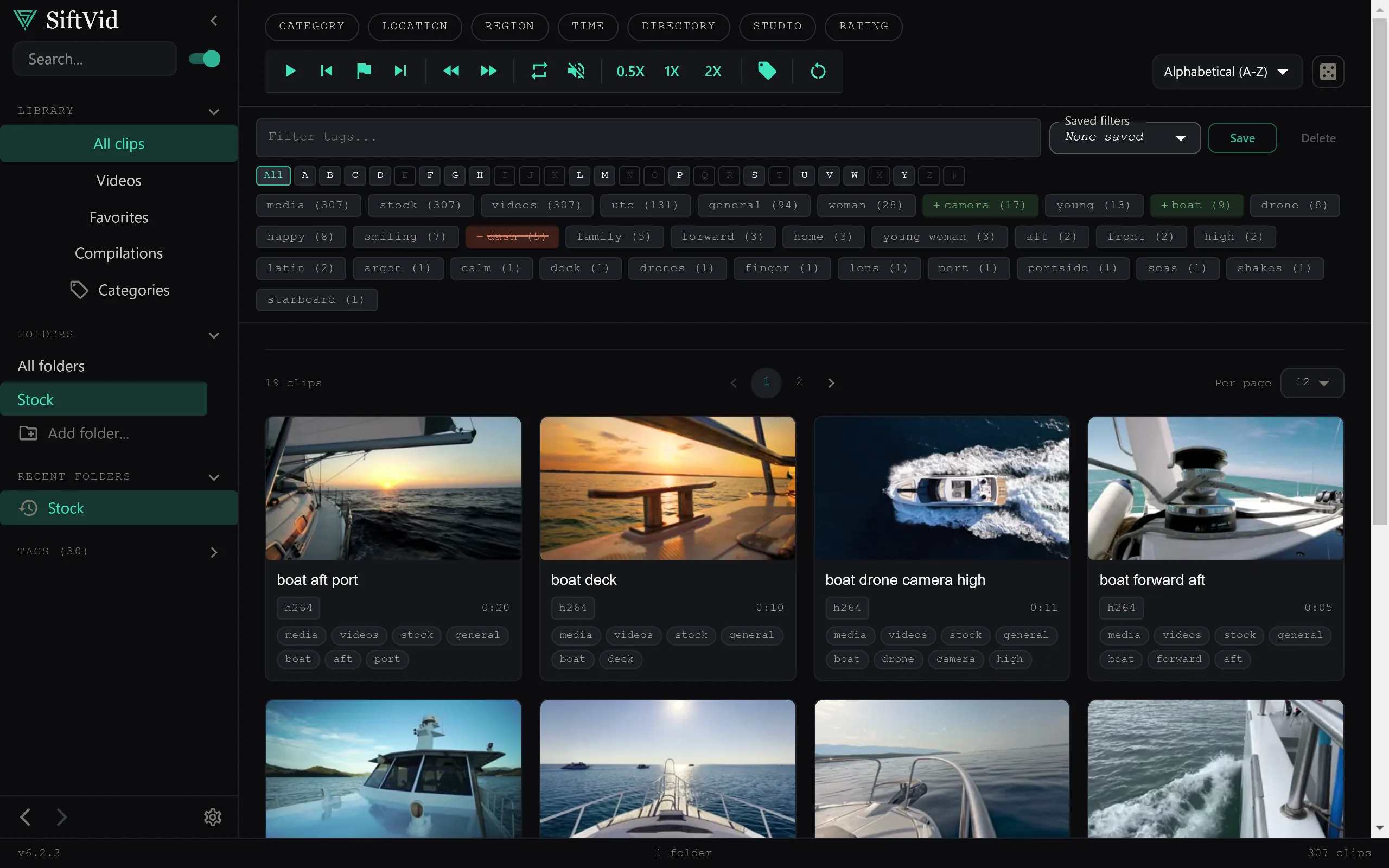
Step 3: Search and Watch (2 seconds)
Your library is now organized. Type any word from a filename in the search bar. Results appear in under 1 second.
- Filter by category → instant results
- Sort by longest, newest, largest → works everywhere
- Add custom tags → your organization, your rules
The Numbers
We tested this with real libraries:
- 100 videos: instant (under 0.1 s)
- 1,000 videos: under 1 s
- 5,000 videos: 2 s
- 10,000 videos: 3 s
- Larger libraries: seconds, not minutes
Compare that to manually tagging: 10 seconds per video × 10,000 videos = 27 hours. We save you 27 hours on a 10,000-video library. In under 3 seconds.
Common Questions
What if I have videos across multiple folders?
Add them all. The app merges everything into one searchable library. Videos on C:, D:, an external drive? No problem. Search them all at once.
What if I download more videos later?
Click “Refresh.” The app scans for new videos. Takes a fraction of a second.
Why is it so fast?
We don't upload your videos to a server. We don't transcode anything. We just read the filenames and metadata. That's it.
5 seconds of setup saves years of folder frustration.
Keep reading
Use Custom Tags to Create Your Perfect System
Auto-tags are great. But your tags are better. Here's how to build a tagging system that fits your workflow — ceremony clips, drone footage, coaching drills, or any category you define.
Rediscover Forgotten Files With Random Discovery
You forgot half your collection exists. The dice button brings it back. Filter first, then randomise — surface footage from years ago with one click.