Why Sort Works Everywhere (And Why That Matters)
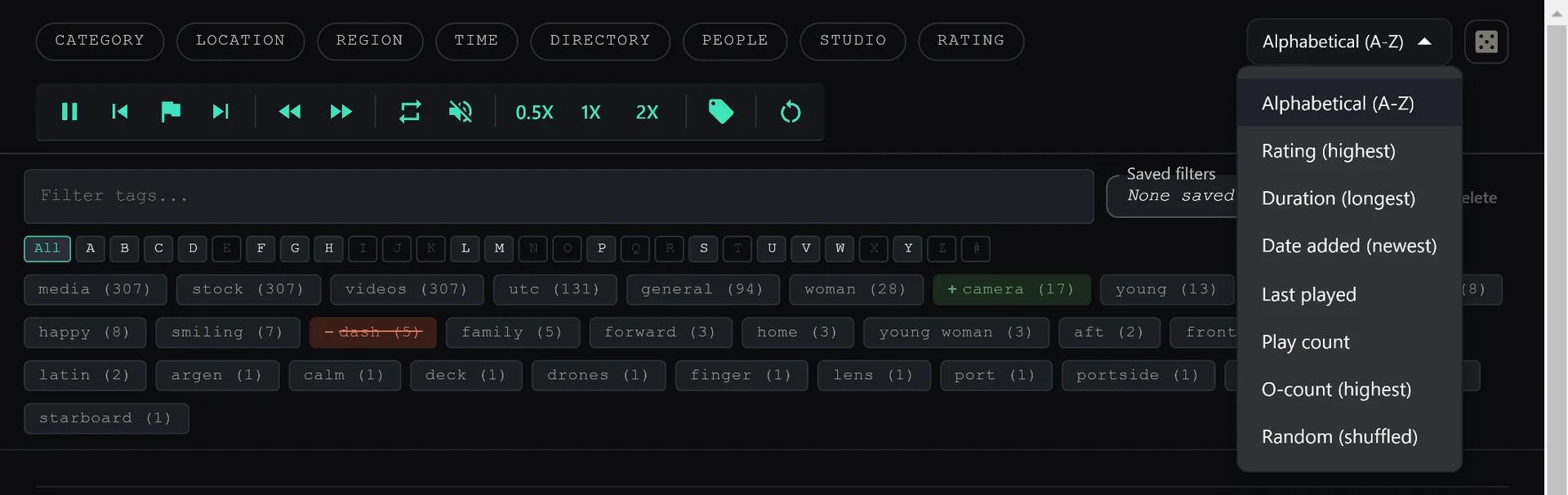
Search results, categories, tags — sort by codec, size, duration, or date in any view. Other apps reset your sort when you switch views. SiftVid doesn't.
Sort Is Not Just a List Feature
Most video managers let you sort your main library. Great. But switch to a category view, run a search, or filter by a tag — and the sort resets. You're back to default, clicking through menus again.
SiftVid applies sort to every view. Search results, category lists, tag filters, favorites, all of it. The sort you pick stays until you change it.
What You Can Sort By
Every view supports the same sort options:
- Date added — newest files first or oldest first
- Duration — longest or shortest
- File size — largest or smallest
- Resolution — highest quality first
- Codec — group by encoding format
- Filename — alphabetical
Why This Changes How You Work
The Problem Without Universal Sort
You search for a subject. 200 results. You sort by duration to find the longest clips. Great. Now you filter by a tag to narrow it down. Sort resets. You re-sort. Now you switch to a different category. Sort resets again.
Five view changes, five re-sorts. That's friction you stop noticing because you've accepted it as normal.
With Universal Sort
Set sort once. It follows you everywhere. Search, filter, switch categories, open a tag — your sort persists. The UI gets out of the way and lets you work.
Real Workflows
Culling After a Shoot
Sort by duration descending across your import folder. The longest clips — the ones with the most coverage — float to the top. Review them first, then work down.
Finding High-Quality Footage
Filter to a category. Sort by resolution descending. Your 4K clips are at the top. Your 720p phone footage is at the bottom. Pick appropriately for the project.
Reviewing a Specific Tag
Filter by a custom tag like keeper. Sort by date added. Your most recently tagged clips are first. Review in the order you collected them.
Sort once. Work everywhere. That's how it should work.
Keep reading
The Complete Search Guide: Find Anything in Seconds
Smart Search finds what you're looking for even with typos. Fuzzy matching. Boolean logic. Category filters. Here's how to dig deep and master the search features to find any video instantly.
Preview On Hover: See Before You Click
Hover over any video. Watch a 5-second preview. Click if you like it. Move on if you don't. Never waste time clicking blind again.