Emby alternative for Windows video library
Looking for a local-first Emby alternative on Windows? SiftVid organizes video libraries with smart tags, fuzzy search, and clip tools.
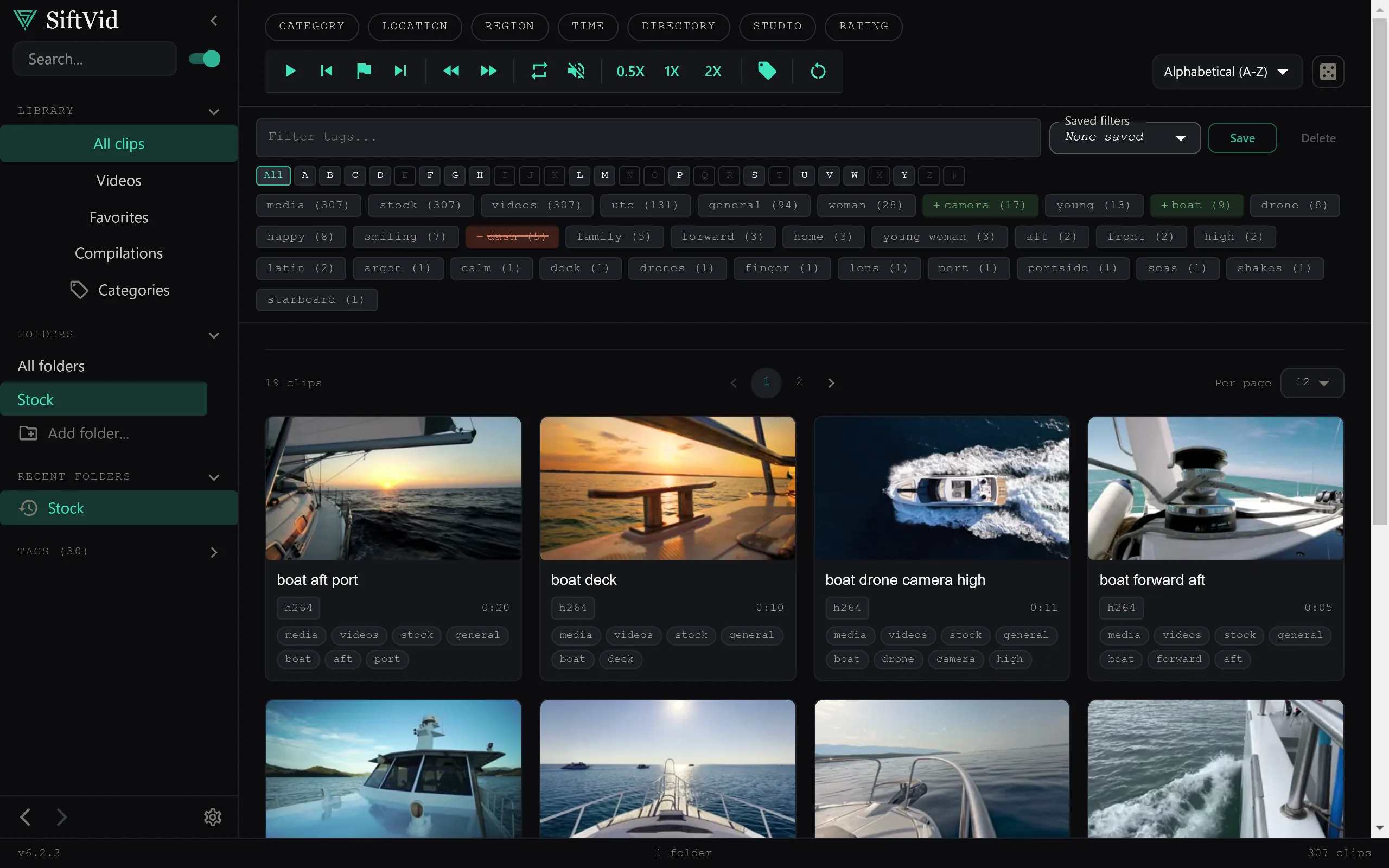
Many users start with Emby to organize large video collections. It is a robust media server that works well for network streaming. However, if your primary use case is watching, clipping, or editing local files on a Windows desktop, a dedicated desktop organizer might fit better. Emby requires a server setup, often on a dedicated NAS or home server, and its focus is on serving media to remote clients. If you want a solution that runs entirely on your current PC with no server overhead, a local-first alternative is worth considering.
Why switch to a local-first approach?
The main friction point with server-based solutions like Emby is the complexity. You need to configure metadata scrapers, manage database indexes, and ensure your devices can reach the server. For a library that lives primarily on a local SSD or HDD, this adds unnecessary layers.
A local-first Windows application handles your library differently. It scans your folders, extracts metadata from filenames and directory structures, and builds a search index directly on your machine. There is no data leaving your computer. This means faster startup times, no latency when seeking through files, and zero worry about server availability. Your video library is just a set of files on your drive, indexed for instant access.
How SiftVid handles your library
SiftVid is a desktop app for Windows 10 and 11 designed specifically for local video management. Instead of relying on external metadata services, it uses smart tags derived from your existing file system. If you have a consistent naming convention, such as Artist - Title (Year).mp4, SiftVid parses that structure automatically. It understands folders as categories, allowing you to browse your collection without needing to manually enter data for every file.
The core of the experience is the search bar. It uses fuzzy search with Boolean logic, supporting AND, OR, and NOT operators. This is critical for large libraries where you might want to find specific content without typing out the exact filename. You can search for fragments, combine multiple criteria, and filter out unwanted results in real-time. You can learn more about how the search engine prioritizes results on the features page.
Key features for organization and editing
Beyond basic browsing, the value of a desktop organizer lies in its utility for working with the footage. SiftVid includes an A-B section loop player. This is essential for finding the exact start and end points of a clip without jumping back and forth through the entire file. Once you have marked your sections, you can export them.
The export options include MP4, MOV, and ProRes formats. This makes it a useful tool for content creators who need to isolate specific moments from larger files. Furthermore, SiftVid generates Premiere XML and DaVinci Resolve EDL cut lists. This means your organized clips can drop directly into professional editing suites, maintaining your project structure.
For users who want a more interactive browsing experience, the Category Theater view provides a visual way to navigate through large collections. It is less about streaming to a TV and more about curating and accessing local content efficiently.
Is there an AI component?
Some media managers promise "AI-powered" organization that works out of the box. SiftVid takes a different approach. It includes a train-your-own linear probe AI feature. This is not a black-box model that guesses what you want. Instead, it allows you to define categories or tags and show the system examples. It learns from your specific labeling habits. Since this is a train-your-own system, it does not rely on pre-seeded generic knowledge. It becomes useful only after you have provided enough examples of how you categorize your own files. This ensures the system aligns with your specific organizational logic rather than forcing a generic schema on you.
Comparison: Server vs. Desktop
| Feature | Emby (Server-based) | SiftVid (Desktop) |
|---|---|---|
| Primary Use | Remote streaming | Local viewing/clipping |
| Setup Complexity | High (Server config) | Low (Install & Scan) |
| Data Location | Server/NAS | Local Windows PC |
| Metadata Source | Scrapers/DB | Filenames/Folders |
| Editing Export | Limited | Premiere XML / EDL |
| Cost Model | Varies by Plan | $14.99 One-time |
| Account Needed | Yes | No |
The table highlights the fundamental difference: Emby is a media server, SiftVid is a local workspace. If you already have an Emby server for streaming to your phone or TV, you might keep it for that specific purpose. However, for the day-to-day task of organizing, searching, and clipping videos on your Windows machine, a dedicated desktop tool removes the overhead of connecting to a server.
Getting started with SiftVid
If you are considering moving your local workflow to a desktop app, SiftVid offers a 7-day full-access free trial. You can download the app from the SiftVid home page and see how the scanner handles your specific folder structure. The pricing is a one-time purchase of $14.99, with no recurring costs. You can view the pricing details to confirm the trial terms.
To understand the technical specifications better, the features page lists the supported file formats and the exact capabilities of the A-B loop player. If you have questions about how the local-first architecture handles large drives, the FAQ covers common scenarios. When you are ready to start, you can download SiftVid for Windows directly from the site.
Final thoughts
Choosing an Emby alternative for a Windows video library often comes down to intent. If your goal is to stream media to multiple devices on a network, Emby remains a strong choice. If your goal is to have a fast, private, and powerful tool for managing, searching, and clipping local video files on your PC, SiftVid provides a focused, local-first solution. It respects your file structure, keeps your data private, and integrates smoothly with professional editing workflows. By eliminating the server layer, it simplifies the entire process of maintaining a personal video library.
Keep reading
Organize Family Videos Locally with SiftVid
Learn how to organize a lifetime of family videos on your local PC using SiftVid. Keep files private, searchable, and safe from remote risks.
Organize Band Rehearsal Videos Fast
Stop losing takes in file sprawl. Use SiftVid to tag, search, and loop specific song sections in your local band video archive.