Organize Family Videos Locally with SiftVid
Learn how to organize a lifetime of family videos on your local PC using SiftVid. Keep files private, searchable, and safe from remote risks.
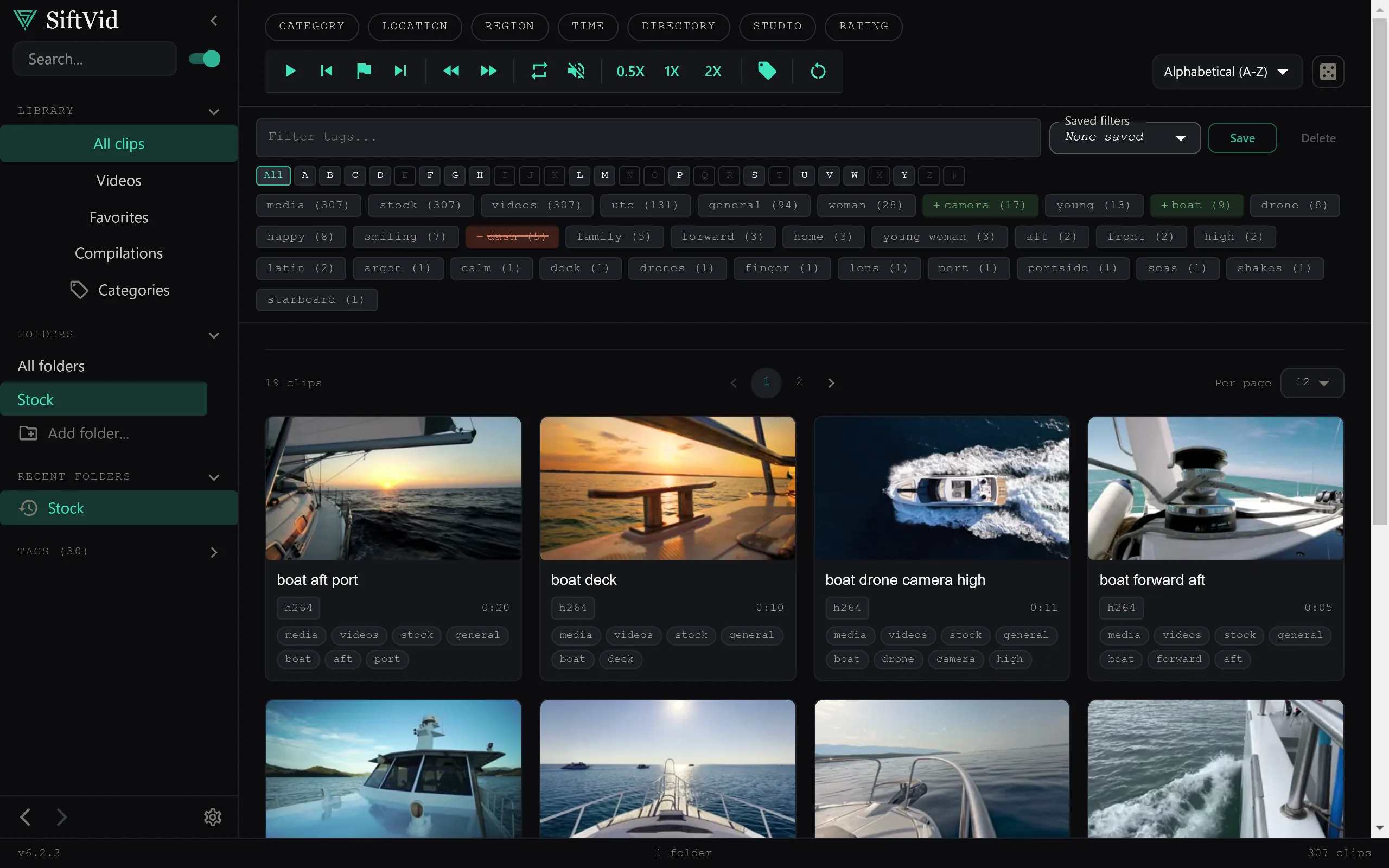
Staring at thousands of unorganized video files is a common problem for anyone who has been capturing family memories for years. Whether it is graduation ceremonies, birthday parties, or casual weekends, the sheer volume of digital footage can become overwhelming. Most people try to manage this with basic file system folders, but as the library grows, that structure collapses. Finding a specific clip from 2010 becomes a guessing game.
The solution does not require moving your life to the internet. It requires a robust local organization system that respects your privacy while making your archive searchable. Here is how to build a durable, private home video library on your own machine.
Why Remote Services Fail for Family Archives
The most common advice for organizing media is to use remote storage. However, for a lifetime of family videos, this approach has significant drawbacks. First, the cost. Storing hundreds of gigabytes or terabytes of high-resolution video often exceeds ongoing service budgets. Second, and more importantly, is the issue of privacy. Family videos are personal. You likely do not want your child’s first steps or private family moments indexed on third-party servers where data policies can change, or where the company itself can access the content.
A local-first approach solves both problems. By keeping the videos on your PC, you retain full control. There are no recurring fees, no data caps, and no risk of your account being locked out or your data being used for advertising. You own the data, physically, on your hardware.
The Problem with Manual Folder Structures
If you have tried to organize videos by date (e.g., 2020 > 2020-06-15) or by person (e.g., Kids > Emily > Birth), you know the pain. File systems are rigid. A single video might span multiple categories. A birthday party involves multiple people and happens in a specific location, but a single file can only live in one folder.
When you add new videos, you face a difficult choice: do you move the file to a new folder, breaking previous links, or do you leave it where it is, creating inconsistency? Eventually, the folder structure becomes a mess of "Misc" and "Unsorted" directories.
Introducing Intelligent Local Tagging
The key to organizing a large library without rigid folders is metadata. Instead of relying on where the file lives, you tag the file itself. This is where SiftVid changes the workflow. It is a Windows desktop application designed specifically for local media libraries. It uses smart tags derived from filenames and folder structures to build a flexible database.
When you point SiftVid at your video directory, it scans the files and generates metadata. If your files are named logically, like 2015_Wedding_John_Mary.mp4, the app can extract the year, event type, and names involved. It does not send these files to the internet. All indexing happens on your machine. This means your library gets smarter and more searchable without compromising privacy.
Mastering Search: Find Anything in Seconds
A disorganized library is useless if you cannot find what you need. Traditional file search is slow and imprecise. SiftVid implements fuzzy search with logical operators like AND, OR, and NOT. This allows you to ask complex questions of your archive.
For example, you might want to find all videos from 2018 that feature "Emily" but do not contain the word "birthday" (perhaps to make a non-birthday montage). A standard file search cannot do this. In SiftVid, you can construct a query like 2018 AND Emily NOT birthday. The result is instantaneous because the search happens against a local index, not a remote server.
This level of control is crucial for editing. Imagine you are working on a memorial video or a family tree documentary. You need to pull clips based on multiple criteria: date range, people present, and specific events. Logical search operators turn your hard drive into a responsive database.
Building Stories: From Files to Narratives
Once you can find your videos, the next step is using them. Many family video organizers stop at "finding" and forget that the ultimate goal is often sharing or creating.
SiftVid includes tools to help you assemble clips into a narrative. The A-B section loop feature allows you to identify the best 10 seconds of a long video and loop it for review. This is helpful when you are scanning a 45-minute wedding video to pick out the best moments. You don’t need to scrub through the entire file; you isolate the A-B section and watch it repeatedly to ensure you are selecting the perfect take.
Additionally, the "Make Trailer" function helps you quickly generate a preview of your selected clips. This is useful for checking pacing before you do a full edit. If you are comfortable with professional editing software, SiftVid can export cut lists in Premiere XML or DaVinci EDL formats. This means you can use SiftVid as your pre-production and selection tool, and then hand off the organized list to your professional editor of choice.
Preserving Quality: Export and Compatibility
A common fear with media management software is that it will re-encode your files, leading to quality loss. SiftVid respects the integrity of your original media. It supports export to standard formats like MP4, MOV, and ProRes. If you decide to consolidate files or create a shareable package, you can export the final product without worrying about the source files being degraded.
Because the software is local-first, there is no compression artifact from streaming or remote transcoding. What you see is exactly what is stored on your drive. This is vital for archival purposes. You want these family memories to be playable in 10, 20, or 50 years. Keeping them in standard, high-quality containers on local storage is the most reliable way to ensure longevity.
Getting Started with Your Local Library
Setting up a local video organization system requires a shift in mindset. Stop thinking about folders as your primary organization tool. Think about tags and metadata.
- Consolidate Files: Gather all your video files onto a single local drive or NAS. Ensure filenames follow a consistent convention (e.g.,
Year_Event_People.mp4) if possible. - Install the Tool: Download SiftVid for Windows. The software runs on Windows 10 and 11.
- Index Your Library: Point the application to your video folder. It will scan the files and build the local index.
- Refine Tags: Review the auto-generated tags. Adjust them if the filename conventions were inconsistent. You can also manually add tags for context that isn’t in the filename.
- Test Search: Practice using AND, OR, and NOT operators to find specific clips. The more comfortable you get with search syntax, the more powerful your library becomes.
- Backup: Because the files are local, standard backup practices apply. Use the 3-2-1 rule: three copies of your data, on two different media types, with one copy off-site. SiftVid does not replace backup; it organizes the data you are backing up.
The Value of Privacy and Ownership
In an era where data is a commodity, owning your family history is an act of preservation. You are not renting access to your memories from a tech company. You are keeping them on your own hardware. There is no account to manage, no password to lose, and no risk of a service shutting down and taking your archive with it.
SiftVid is a one-time purchase, not a recurring service. You pay a single fee for the software, and it belongs to you. This aligns perfectly with the philosophy of local-first storage. For the price of a few dinners out, you can secure a tool that will help you manage your family’s video archive for decades.
If you are ready to take control of your digital family history, start by evaluating your current file structure. Then, consider how a dedicated, local tool can simplify the process. Visit the pricing page to see the details, or head to the homepage to learn more about how SiftVid approaches privacy and performance.
Frequently Asked Questions
Does SiftVid require an internet connection? No. SiftVid is a local-first application. It does not require an internet connection to function. All indexing, searching, and editing happen on your computer.
Will my videos be sent to the internet? No. SiftVid does not send your videos to any server. Your files never leave your machine. This is a core privacy feature of the application.
How do I handle very large libraries? SiftVid is designed to handle large local libraries efficiently. Because the index is stored locally, search speeds remain fast even with thousands of files. For the best performance, ensure your local drive has sufficient free space and is an SSD if possible.
Is there a trial version? Yes. You can use a 7-day full-access free trial to test the software before purchasing. This allows you to index your library and test the search features without any risk. Check the FAQ for more details on the trial and system requirements.
Keep reading
Organize Band Rehearsal Videos Fast
Stop losing takes in file sprawl. Use SiftVid to tag, search, and loop specific song sections in your local band video archive.
Emby alternative for Windows video library
Looking for a local-first Emby alternative on Windows? SiftVid organizes video libraries with smart tags, fuzzy search, and clip tools.