Organize Band Rehearsal Videos Fast
Stop losing takes in file sprawl. Use SiftVid to tag, search, and loop specific song sections in your local band video archive.
The Problem with Band Video Libraries
Every serious band or solo artist faces the same file system nightmare. You have forty gigabytes of rehearsal footage, live gig recordings, and vocal take captures scattered across external drives, USB sticks, and desktop folders. When you need to find that one specific drum fill from last month's jam session, or compare two different guitar solos recorded in separate takes, you are stuck manually scrubbing through hours of video.
Most video management software solves this problem by pushing files to remote servers. You upload your footage, register for a service, and hope the internet stays fast enough to stream high-resolution video back to you. For sensitive creative work, however, uploading your unreleased material to a third-party server is a security risk. You want your assets to stay exactly where they are: on your hard drive.
SiftVid offers a local-first alternative. It is a Windows 10 and 11 desktop application that indexes your existing video files without moving them. You do not upload anything. The app reads the metadata and filename information locally, creating a searchable library that runs entirely on your machine. This approach is ideal for musicians who want powerful search capabilities without exposing their intellectual property.
Smart Tags and Fuzzy Search for Music Files
The core of a useful video archive is searchability. SiftVid uses smart tags derived from your filenames and folder structures to categorize content automatically. If you have a habit of naming files like 2023-10-12_Drum_Take_3_vFinal.mp4, the app breaks this down into useful data points. You can then refine your library by renaming files to be more descriptive, such as including song titles or specific performance notes.
Once indexed, you can use fuzzy search with logical operators to find exactly what you need. This is where the tool shines for musicians. Instead of browsing through folders, you can type queries like neon-lights AND 2024 NOT draft. This filters out rough sketches and shows only the polished recordings of that specific track.
For bands with complex naming conventions, this prevents the "file hell" that usually accumulates over a year of recording. The fuzzy search tolerates imperfect or inconsistent naming, so you do not need to be a programmer to retrieve specific assets. You can quickly toggle between shows, rehearsals, or studio sessions using simple text queries.
Looping Sections for Detailed Review
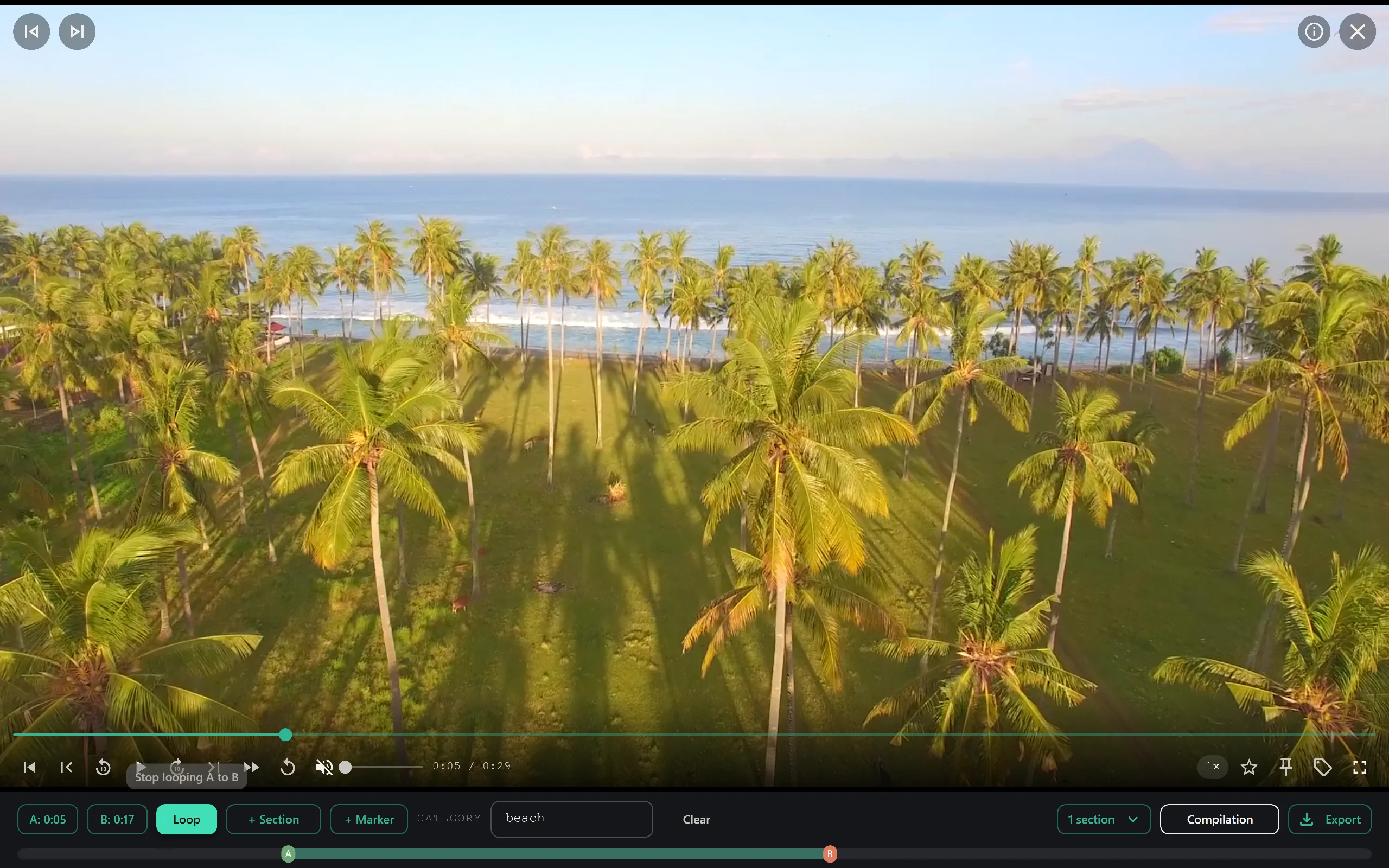
Finding the video is only half the battle. You often need to analyze specific moments. Did the drummer rush the tempo in the bridge? Was the vocal mic clipped during the chorus? SiftVid includes A-B section loops that allow you to isolate specific parts of a video.
You can set point A at the start of a verse and point B at the end of the chorus. The app will then repeat that section continuously. This is invaluable for critical listening and watching. You can place your laptop or monitor near your mixing desk and loop a problematic take while you adjust your gear. Because the software runs locally, the loop is instantaneous. There is no buffering or latency associated with streaming data from the internet.
This feature turns your video archive from a passive repository into an active practice tool. You can mark multiple sections across different files and create a quick review session before a gig or a mixing session.
Creating Trailers and Set Lists
Bands need to market their music. Often, the best promotional material is not a polished studio video, but a high-energy clip from a live set or a spontaneous rehearsal moment. SiftVid includes a Make Trailer feature that helps you quickly assemble clips from your library.
You can select the best ten-second snippets from several different performances and combine them into a single preview. This is much faster than opening a full non-linear editing suite for such a simple task. You can also use the app to generate cut lists for editors. If you are hiring a professional to edit a live concert film, you can export a Premiere XML or DaVinci Resolve EDL file. These files contain the in and out points for all your selected clips, saving the editor hours of manual syncing and scrubbing.
This workflow bridges the gap between casual archiving and professional post-production. You do not need to be an editor to create a basic trailer, but you have the tools to hand off detailed instructions if you are working with a professional team.
Privacy and Local Storage
The most important feature of SiftVid for many artists is what it does not do: it does not touch your files. The application operates in a local-first manner. There is no account registration, no remote synchronization, and no data collection. Your videos never leave your computer.
This is crucial for bands that are working on unreleased material. Leaked tracks can ruin a launch. By keeping your archive on a local drive and managing it with offline software, you eliminate the risk of data breaches associated with online services. SiftVid is a one-time purchase, meaning you do not have to worry about recurring fees increasing over time or losing access to your library if a service shuts down.
The software plays files through a universal FFmpeg layer, covering the vast majority of what modern cameras and audio interfaces output. If you are recording with a DSLR, a dedicated video camera, or a direct interface capture, SiftVid will index and play these files directly. When it is time to deliver, you can export to MP4, MOV, or ProRes.
Getting Started with Your Archive
Transitioning to a structured video archive takes a little bit of initial effort, but the payoff is significant. Start by backing up your existing drives and organizing your folders by year or project. Next, download the trial version to see how the search and tagging work with your specific file naming conventions.
The 7-day free trial gives you full access to all features. You can test the fuzzy search, try the A-B loops, and even export a cut list to see if it works with your editing software of choice. Because the app runs on Windows 10 and 11, make sure your system meets these requirements before purchasing.
You can learn more about the technical details and supported formats on the features page. If you have questions about how the local indexing works or what data is processed, the FAQ covers common concerns.
When you are ready to make the switch, you can download SiftVid for Windows and start organizing your collection immediately. The pricing model is straightforward, with a one-time purchase option that includes the free trial period.
For more information on how SiftVid handles different file types, visit the home page to see detailed examples of the interface.
Conclusion
Managing a band's video library should not require remote storage or a data breach risk. SiftVid provides the tools to search, review, and package your footage efficiently while keeping everything private and local. Whether you are a three-piece indie band or a full production touring group, having immediate access to your history is essential for growth and review.
By using smart tags, logical search, and section loops, you turn a chaotic collection of files into a usable resource. You can quickly find the take you need, loop the section you want to fix, and share the results with your bandmates or collaborators. The result is a smoother creative process and a secure archive of your work.
Take control of your video assets. Stop losing time searching for files and start using them.

Keep reading
Organize Family Videos Locally with SiftVid
Learn how to organize a lifetime of family videos on your local PC using SiftVid. Keep files private, searchable, and safe from remote risks.
Emby alternative for Windows video library
Looking for a local-first Emby alternative on Windows? SiftVid organizes video libraries with smart tags, fuzzy search, and clip tools.