Game Film Review Workflow for Coaches
Build an efficient game film review workflow. SiftVid helps coaches tag, search, and cut clips locally on Windows without external data transfer.
Coaches know that the value of game film is not in the raw footage, but in the specific moments that reveal patterns, errors, and opportunities. However, the traditional method of scrubbing through hours of video to find a single play is inefficient. It kills momentum and burns through coaching time that should be spent on analysis. A better approach is a structured workflow that prioritizes rapid retrieval and precise editing. SiftVid is a Windows desktop application designed specifically to solve this bottleneck, offering a private, local-first environment where your video files never leave your machine.
The core problem for most coaching staff is the "search penalty." You have a folder full of MP4 or MOV files from last night's game, but finding the exact moment where the defensive line collapsed is a manual, frame-by-frame process. SiftVid addresses this by treating video metadata as a first-class citizen. When you add files to the library, the application uses smart tags derived from filenames and folder structures. If you organize your files by date and opponent, SiftVid automatically applies these as searchable metadata. This means you don't need to watch the video to know what it contains. You can query your library using a fuzzy search engine that supports logical operators like AND, OR, and NOT. This allows for complex queries, such as finding plays that included "breakaway" but did not include "turnover," instantly narrowing hours of footage to a few minutes of relevant clips.
Building Your Film Library Locally
The first step in an effective review workflow is ingestion, but with a critical difference: privacy. In a sports environment, proprietary strategies and player performance data are sensitive. SiftVid operates on a local-first architecture, meaning there is no account creation, no external data transfer, and no video ever leaves your computer. You install the application on a Windows 10 or 11 machine, and your data remains exactly where it is. This is a significant advantage over remote-based tools that require you to upload high-resolution game footage to remote infrastructure. With SiftVid, you maintain complete control over your media. You can drag and drop your game files into the application, and it indexes them locally. This setup ensures that sensitive tactical breakdowns are never exposed to third-party infrastructure.
Once the files are in the library, the next step is organization. SiftVid’s Category Theater feature allows you to visualize your library in a grid of categories, making it easy to spot which opponents or time periods you have not reviewed in a while. This visual overview helps coaches prioritize which games to analyze based on upcoming schedules or specific team needs. Because the application is built for speed, you can navigate thousands of clips without the lag associated with remote-synchronized libraries. You are working directly with your local files, which ensures that playback is smooth and responsive, even on older hardware.
Precision Editing with Section Loops
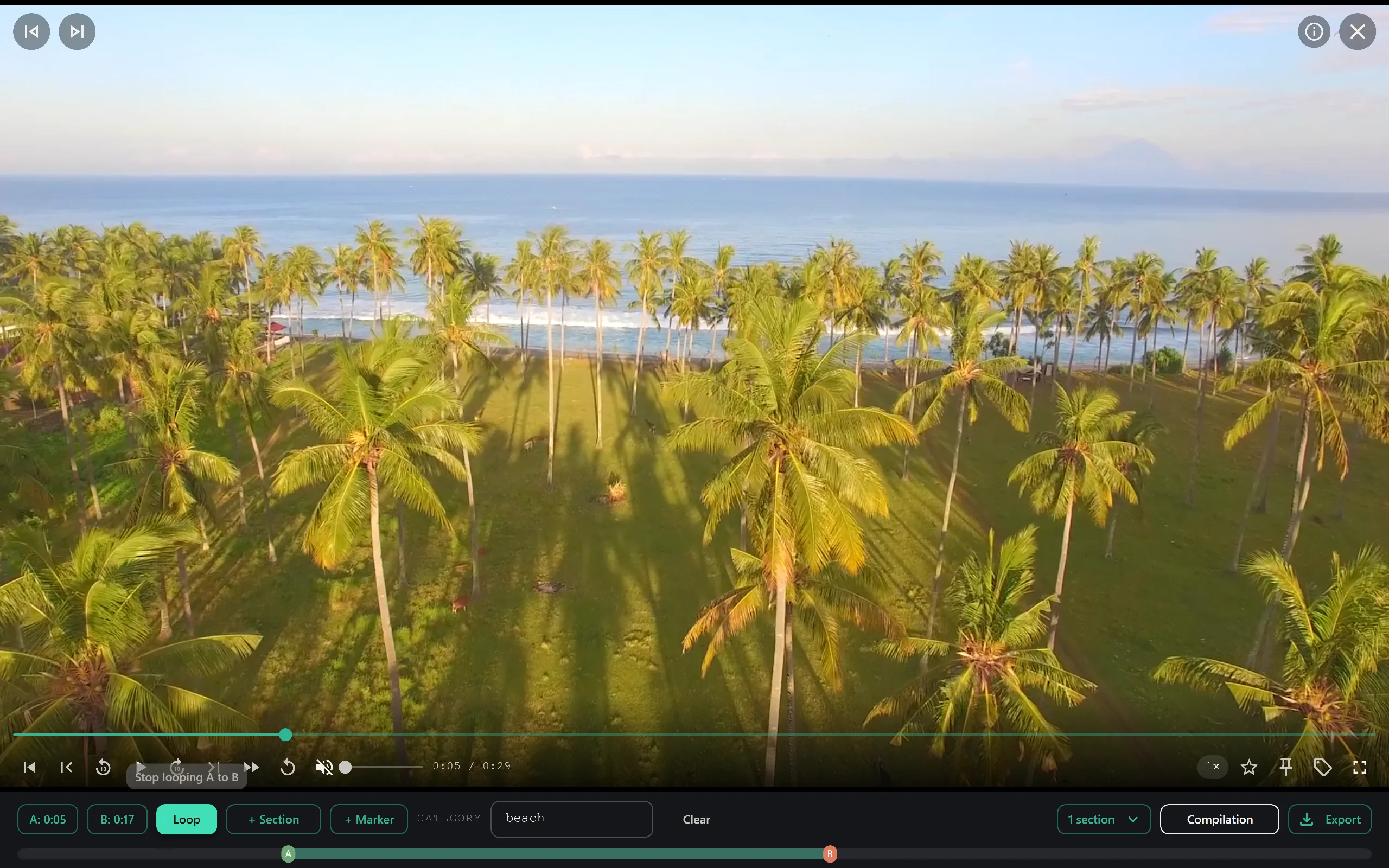
Finding the clip is only half the battle. In sports review, context is everything. A three-second clip of a mistake is useful, but a ten-second clip showing the build-up and the immediate aftermath is far more instructive for players. SiftVid includes A-B section loops that allow you to define an "A" point (the start of the play) and a "B" point (the end of the play) with a single keystroke. Once defined, the player loops between these two points automatically. This is invaluable for detailed breakdowns. You can watch a specific defensive rotation repeatedly without having to manually rewind the timeline every few seconds.
This feature is particularly useful for identifying patterns. If you suspect a certain player is favoring one foot during a sprint, you can set an A-B loop on their stride and review it multiple times to confirm the biomechanical issue. The loop runs locally and instantly, providing immediate feedback. You are not waiting for a remote render or a server response; you are interacting directly with the video data on your hard drive. This immediacy keeps the coaching session dynamic and focused. You can jump between different A-B loops across multiple videos to compare similar situations from different games, building a comprehensive understanding of the team's tendencies.
Exporting and Sharing Insights
After you have identified the key moments, the next challenge is sharing them with your team. You need to create concise, high-impact clips that can be shown in film meetings or sent to players for individual study. SiftVid supports exporting your selected clips to standard formats like MP4, MOV, and ProRes. You can choose the quality and codec to suit your distribution method, whether that is a high-fidelity file for a large screen in the team room or a compressed file for mobile viewing.
For coaches who use professional editing software, SiftVid integrates seamlessly. You can export cut lists in Premiere XML or DaVinci EDL formats. This means you can do your initial review and tagging in SiftVid, then hand off the precise timecodes to your video editor in their preferred NLE (Non-Linear Editor). You don't need to re-mark your in-and-out points in another application. The metadata and timecodes translate directly, saving you hours of redundant work. This workflow allows the coach to stay in the analysis role while the technical aspects of editing are handled by the standard tools you already use.
Customizing Your Analysis with AI
While SiftVid’s built-in search and tagging capabilities are powerful, you can take your workflow further with its AI features. The application includes a train-your-own linear probe AI. This is not a pre-packaged, generic solution that guesses at content. Instead, it is a flexible tool that you train on your own specific data. If you want the AI to help identify specific plays or moments based on your own definitions, you can build a model that learns from your tagged examples.
This approach is unique because it is transparent and customizable. You define what you are looking for, and the system learns from that feedback. This is particularly useful for advanced analytics where standard keywords might not capture the nuance of a specific tactical situation. Because the AI runs locally, you are not sending your sensitive game data to an external service for processing. You retain full intellectual property rights over your analysis and your data. This feature is optional and can be as simple or as complex as your needs require, ensuring that you are not forced into a one-size-fits-all solution.
Implementing the Workflow
To get started, download SiftVid for Windows from the official site. The application is a one-time purchase, which eliminates recurring costs that can add up for small coaching budgets. There is a 7-day full-access free trial, allowing you to test the entire feature set on your own game film before committing. You can download the installer, import your first set of game videos, and begin tagging them immediately.
The key to success is consistency. Use a strict naming convention for your files so that the smart tags are accurate from the start. Organize your folders by season, opponent, and date. As you review games, use the A-B loop feature to isolate key plays and export them for team meetings. Over time, your library will become a powerful database of team performance, accessible with a few keystrokes. By keeping everything local and using a dedicated tool for video review, you can reclaim the hours previously lost to manual scrubbing and start focusing on what really matters: improving your team.
For more details on the specific capabilities, visit the features page. If you have questions about the file formats or the AI training process, the FAQ section provides detailed answers. You can also check the pricing page to learn more about the one-time license and the free trial options.

Keep reading
Manage Real Estate Videography Footage Locally
Stop losing property shoots. Local-first tools help real estate videographers organize, tag, and export MP4/ProRes files securely and fast.
Efficient Dashcam Footage Review Workflow
Streamline dashcam and security camera review. Learn how to organize, search, and clip incident footage locally with SiftVid’s smart tags and fuzzy search.