Plex Alternatives for Local Files & Private Media
Explore Plex alternatives for private media. SiftVid is a local-first Windows app for searching, tagging, and editing clips without accounts or cloud reliance.
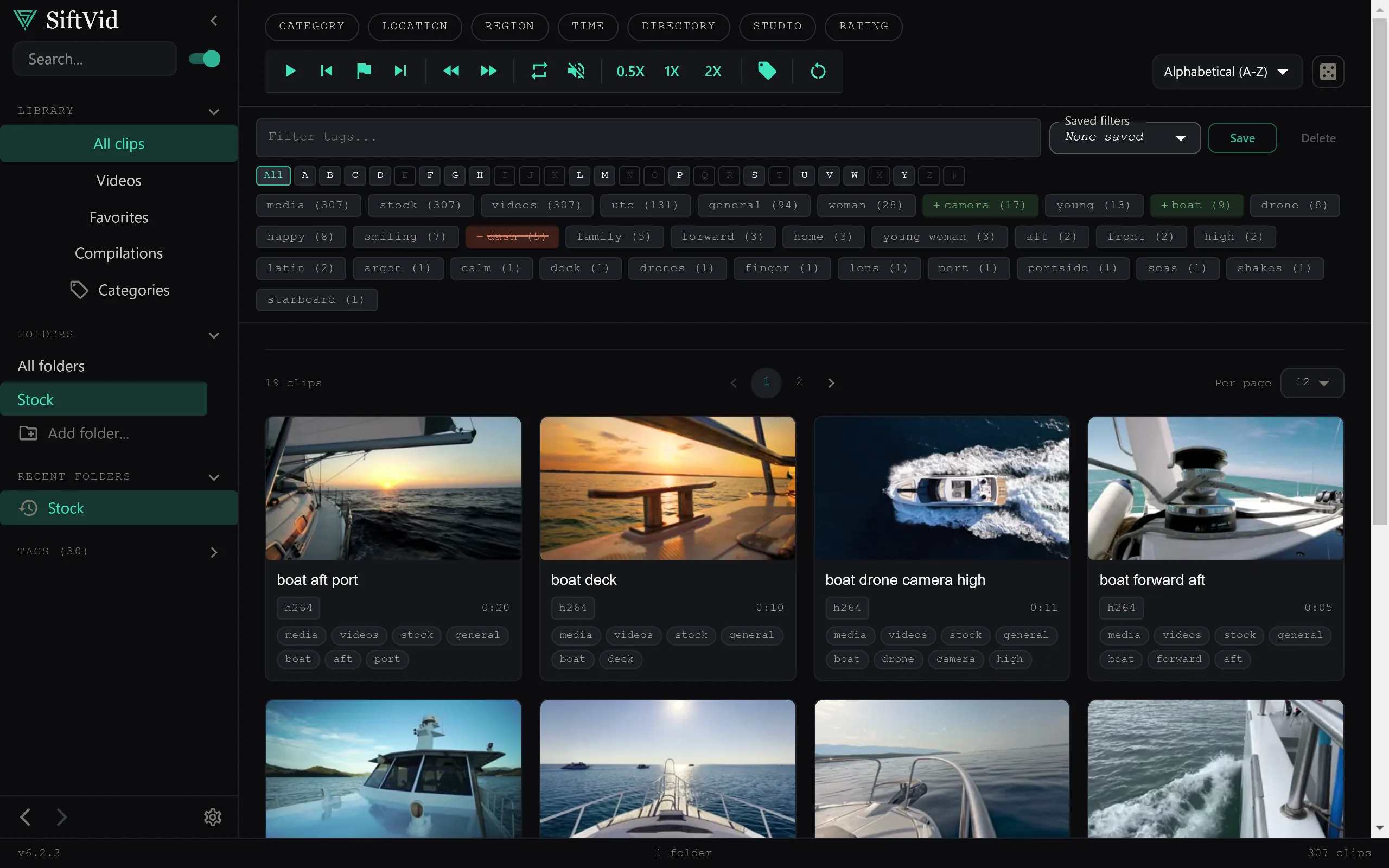
Many creators and archivists start with Plex because it is a robust media server. It shines for streaming content across a house or even to the internet. However, when you need a tool for deep, local workflow—specifically for searching, tagging, and editing individual clips on a single desktop machine—server-based software often becomes a liability.
The core friction is architectural. Media servers are designed to aggregate libraries for playback. They are not optimized for the granular, non-linear access patterns required by video editing, archiving, or complex local retrieval. If you are working with raw footage, B-roll, or a personal archive that must remain entirely offline, you need a different class of software. You need a local-first application that treats your hard drive as the primary and only source of truth.
Why Local-First Matters for Privacy
When you run a media server, metadata and thumbnail generation are coupled to the server process, and the software ties your library to an online account. Plex in particular requires an account, and its remote-access features relay through Plex's own infrastructure. If you want remote playback that is a reasonable trade-off; if your goal is strict data sovereignty, it is an unnecessary dependency.
If your goal is strict data sovereignty, the software stack needs to be simpler. You want an application that does not require a network connection to function. You want to know for certain that your file names, folder structures, and media bytes never leave the machine.
A true local-first approach means no accounts are created, no data is uploaded, and no remote indexing occurs. The software runs entirely within the local operating system environment. For sensitive projects, legal archives, or private creative work, this isolation is not a feature; it is a requirement. It ensures that your media management remains a private matter, untethered from third-party infrastructure.
The Limitations of Server-Based Search
Media servers use database indexes to allow for fast browsing. This is excellent for "show me all the movies in this folder." However, it is often insufficient for "find the specific three-second clip in this 4K interview where the subject mentions the word 'budget'."
Traditional server tools struggle with:
- Granular Tagging: They usually rely on file metadata. If the file isn't tagged, the server doesn't know what's inside.
- Complex Query Logic: Basic "contains" search is common, but logic operators like AND, OR, and NOT are often missing or difficult to use.
- Non-Streaming Focus: The UI is built for pressing "Play," not for scrubbing, loop points, or section isolation.
If you are managing a library where the value lies in the specific moments within the files, rather than the files themselves, you need search that understands the context of your filenames and folder structures.
A Better Approach for Local Retrieval
SiftVid is designed specifically for this gap. It is a Windows 10/11 desktop application that does not act as a server. It does not stream video to other devices. Instead, it acts as a powerful, local index and retrieval engine.
Because it is a desktop app, it operates with zero network dependency. There is no remote storage, no remote sync, and no internet-based playback. Your videos never leave the machine. This architecture ensures that the tool is as private as the file system itself.
Smart Tags and Fuzzy Search
One of the most significant hurdles in local media management is the chaos of file naming. If you have a folder full of files named VID_001.mp4, IMG_2201.mov, and take_final_v3.mov, standard file search is useless.
SiftVid addresses this by generating smart tags from filenames and folder paths. It doesn't just look for exact matches. It uses fuzzy search that allows for typos and variations. More importantly, it supports boolean logic. You can construct queries using AND, OR, and NOT operators.
For example, if you are searching for a specific clip, you might search for interview AND (budget OR finance) NOT b-roll. This level of control is essential for large archives where you need to filter out irrelevant files quickly.
Workflow-Ready Features
Searching is only half the job. Once you find the clip, you need to work with it.
A-B Section Loops: In video editing, you often need to review a specific segment repeatedly. SiftVid allows you to set A-B in/out points and loop that specific section. This is invaluable for detailed review, color correction, or sound mixing without the overhead of opening a full NLE.
Category Theater: If you are curating a selection of clips, Category Theater stitches the matching segments of a category into a continuous preview loop, so you can review a whole collection without opening files one by one.
Make Trailer: For quick previews, the Make Trailer feature helps you assemble a basic sequence. This is useful for creating quick look books or internal reviews without leaving the app.
Export and Integration
A local tool is only as good as its ability to hand off to professional software. SiftVid supports export to MP4, MOV, and ProRes formats. This means you can create deliverables directly from the app.
More critically for editors, it generates cut lists. You can export a Premiere XML or a DaVinci EDL. This allows you to define a selection in SiftVid and immediately open it in a professional non-linear editor. This bridges the gap between the "search/review" phase and the "edit" phase.
The AI Component: Train Your Own
Many modern media tools tout "AI" features that rely on pre-trained models hosted in the cloud. These models can be a privacy risk because they require uploading data to third-party servers for processing.
SiftVid takes a different approach. It features a linear probe AI that you train yourself. This is not a black box that works out of the box with generic knowledge. Instead, it is a local model that you configure based on your specific needs.
Because you are the one training the probe, the model knows exactly what is relevant to your specific archive. It runs locally, on your hardware, ensuring that no data is sent to an external server for inference. This makes the AI feature a privacy-safe addition to your workflow, rather than a compromise.
Getting Started with Local-First Media
If you are currently using a media server and feeling the limitations of remote playback and online dependencies, consider shifting to a dedicated local tool. The move is about aligning your software architecture with your privacy and workflow requirements.
SiftVid is available as a one-time purchase for Windows 10 and 11. It is not a recurring service; you pay once and own the software. There are no ongoing fees or remote storage costs.
To see how it works, you can start with a 7-day full-access free trial. This allows you to test the search logic, the A-B loops, and the export features on your own local files without any risk.
If you are ready to take control of your local media workflow, you can visit the download page to get the installer. You can also check out the full feature list to see the exact capabilities, or browse the FAQ if you have specific technical questions about format support or performance.
For more details on the pricing structure and what the trial includes, visit the pricing page. And if you want to see how SiftVid fits into a broader privacy-focused tech stack, visit the home page.
Moving away from server-based solutions for local work is a step toward a more controlled, private, and efficient media management system. It puts the power back in your hands, on your machine, with no intermediaries.
Keep reading
Kodi alternative for organizing local video files
Stop wrestling with Kodi scrapers. Use SiftVid, a local-first Windows tool, to organize media with smart tags and fuzzy search without online dependencies.
Manage Real Estate Videography Footage Locally
Stop losing property shoots. Local-first tools help real estate videographers organize, tag, and export MP4/ProRes files securely and fast.