Video Editor Rushes & B-Roll Organization Workflow
Master how to organize rushes and b-roll efficiently. Learn local-first tagging, search workflows, and prep techniques for faster editing in SiftVid.
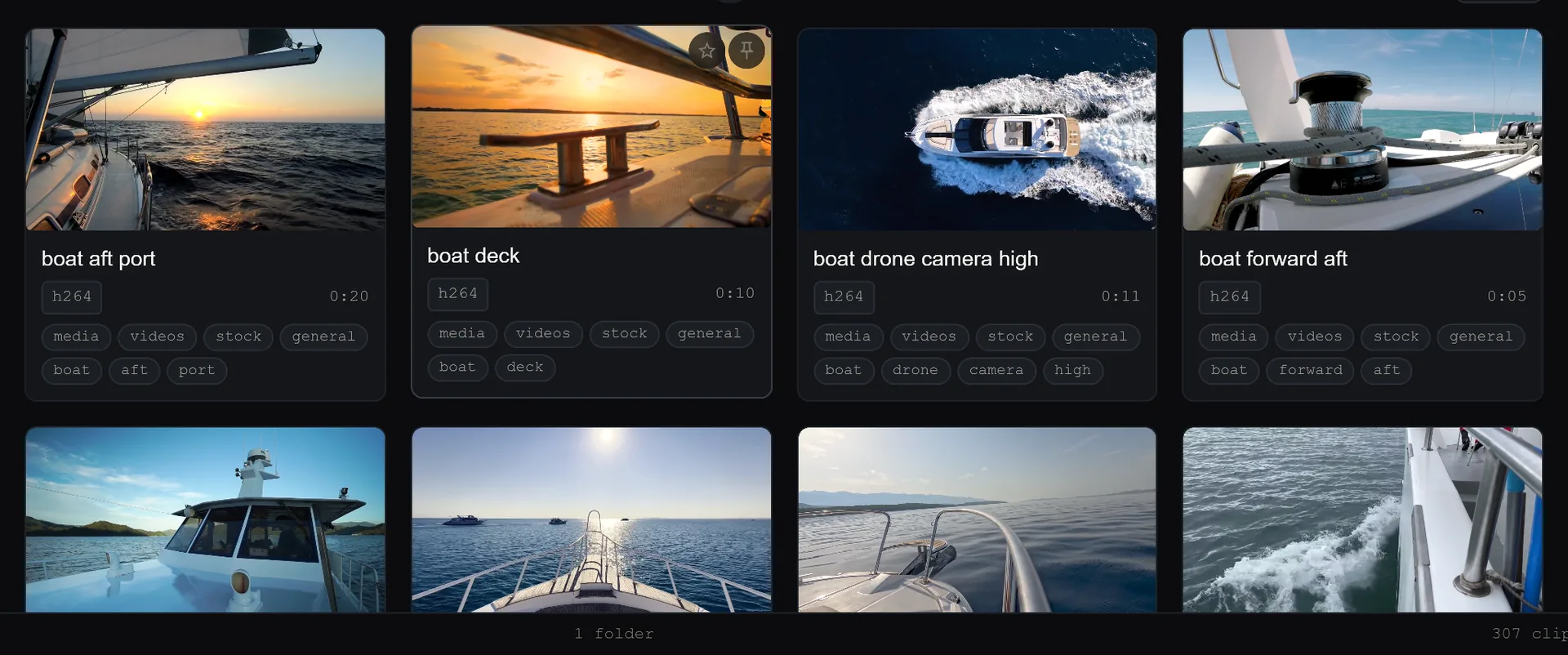
For most video editors, the hardest part of the job isn't the creative cut; it’s finding the right clip. If your footage lives in a chaotic pile of unsorted files, every time you need a specific B-roll shot, you waste hours scrubbing through timelines or digging through nested folders. A robust organization system turns hours of searching into seconds of selection.
The core challenge with rushes and B-roll is scale. A single project might generate hundreds of camera angles, multiple takes, and hours of supplemental footage. Without a structured approach, your brain becomes the only database, leading to fatigue and missed moments. The goal of pre-edit organization is simple: make every frame findable by meaning, not just by filename.
The Problem with Manual Organization
Most editors rely on standard file system folders. While folders are fine for high-level project separation, they fail at the clip level. Imagine trying to find "wide shot of the speaker smiling during the second question." In a folder named Interviews_Raw, that clip is buried.
Manual renaming is the usual countermeasure, but it is brittle. One missed file means a broken link. One inconsistent tag means a search failure. Furthermore, traditional file management is linear. You can only view files one by one or in a basic grid. You cannot ask your file system, "Show me every wide shot from the second interview setup."
This is where modern media management tools shift the paradigm. Instead of organizing files by their location on disk, you organize them by their content metadata.
Building a Local-First Metadata System
The most effective way to handle large volumes of footage is to use a local-first application that indexes your media without moving the files. SiftVid, available as a Windows 10/11 desktop app, is designed specifically for this local workflow. Because it runs entirely on your machine, your video files never leave your drive. There is no external data transfer, no account requirement, and no upload step. This ensures that your sensitive client footage remains private while still benefiting from advanced search capabilities.
When you import a project into a tool like this, the first step is not to rename files, but to tag them.
Smart Tags and Fuzzy Search
SiftVid uses smart tags derived from filenames and folder structures, but the real power comes from user-defined tags and a fuzzy search engine. You can assign tags like B-ROLL, WIDE, LOW-ANGLE, or ACTION to specific clips.
The search interface supports boolean logic, which is a game-changer for finding specific shots. Instead of scanning a playlist, you type a query like:
"wide" AND "smile" NOT "blurry"
This immediate filtering capability allows you to build your edit bin in minutes. You can search for all A-cam clips from the morning setup while excluding the takes you already tagged as rejects. This precision eliminates the guesswork of manual sorting.
The Power of A-B Section Loops
Once you have identified the clips you need, the next step is reviewing them. Traditional NLEs require you to drag clips onto a timeline just to review them. This clutters your sequence with temporary markers.
A more efficient workflow involves using A-B section loops. In SiftVid, you can mark an A-point and a B-point within a single clip to create a loop. This is perfect for isolating a specific performance or a key moment in a long take. You can loop that 5-second segment repeatedly to ensure you have the exact in-and-out points before you even touch your editing software. This reduces decision fatigue and ensures that when you finally drag the clip to your NLE, it is already trimmed to the perfect length.
Prepping B-Roll for the Edit
B-roll is the glue of a video edit. It covers jump cuts, explains action, and adds visual interest. However, B-roll is often the last thing to be organized because it feels secondary to A-camera dialogue. This is a mistake. If your B-roll is untagged, you will end up cutting around it or improvising in the timeline, which slows down the entire process.
Dedicate a specific session to B-roll tagging. Use the same tag vocabulary as your A-camera clips for consistency. If you tag a B-roll clip with PRODUCT, it should be searchable alongside A-camera shots that feature the product. This cross-referencing allows you to see the context of a shot immediately.
For example, if you are editing a product review, you might search for "product" AND "close-up". You can then quickly loop the best three angles and prepare them for the edit. By the time you start the cut, your B-roll is ready to drag and drop.
Automating the Workflow with AI Probes
For complex projects, manual tagging can become time-consuming. SiftVid offers a feature called the linear probe AI. It is not a black-box AI that makes magic guesses; it is a "train-your-own" tool.
If you have a specific type of shot that appears frequently, such as "handheld shaky cam" or "studio key light," you can create a set of training clips. You tag these clips with your specific term, and the linear probe learns the visual or metadata patterns associated with that tag. Over time, you can apply this probe to untagged footage to suggest tags automatically.
This is particularly useful for large rushes folders. You might have 500 clips from a wedding day. By training a probe on the 50 best "candid laugh" clips, you can run the probe over the remaining 450 clips to find similar moments you might have missed during the initial review. This hybrid approach—human supervision with AI-assisted suggestions—scales your workflow without sacrificing control.
Exporting Cut Lists for Your NLE
Once your rushes and B-roll are organized, tagged, and looped, the final step is getting that data into your non-linear editor. Manually retyping timecodes or dragging clips one by one is inefficient.
SiftVid solves this by exporting standard cut lists. It supports Premiere XML and DaVinci Resolve EDL formats. These files reference your selected clips with their in/out points and file paths. When you import the XML or EDL into your NLE, the sequence is already built and your clips arrive pre-trimmed to the segments you marked.
This handoff process eliminates the "transfer" friction. You do not have to recreate your organization inside the NLE. You simply open your sequence and start editing. The structure you built in SiftVid becomes the structure of your final project.
Streamlining Your Edit with Local Tools
The difference between a stressful edit and a smooth one often comes down to how much time you spend searching for media. By implementing a metadata-driven workflow with local-first tools, you reclaim hours of production time.
You gain control over your files, privacy for your content, and speed in your search. The combination of fuzzy search, boolean operators, and AI-assisted tagging creates a library that grows smarter the more you use it.
If you are ready to upgrade your media management, you can explore the full feature list at features to see how these tools work in detail. You can also check out the pricing page to learn about the one-time purchase model and the 7-day free trial. For a quick start, the download page provides the latest version of the app for Windows.
Take the time to organize your rushes before you edit. Your future self, staring at a deadline, will thank you.
Keep reading
Manage Real Estate Videography Footage Locally
Stop losing property shoots. Local-first tools help real estate videographers organize, tag, and export MP4/ProRes files securely and fast.
Organize Family Videos Locally with SiftVid
Learn how to organize a lifetime of family videos on your local PC using SiftVid. Keep files private, searchable, and safe from remote risks.